
In this article
Download a free editable template for a proposal, client review, board update or quarterly business review. Use the PPTX in PowerPoint or import it into Google Slides. Each deck contains text and shapes in a 16:9 layout, with prompts for your own evidence and decisions.
The four original Syaxis templates use English placeholder text and are available without signing in. Choose a download first, follow the Google Slides import steps if needed, then adapt the matching meeting outline.
What to take away.
Choose a template for the meeting’s decision, not just its appearance.
Replace every placeholder with your facts; keep historical results, assumptions and forecasts separate.
The downloadable PPTX files contain editable text and shapes; inspect the result after importing into another editor.
Download templates for PowerPoint or Google Slides
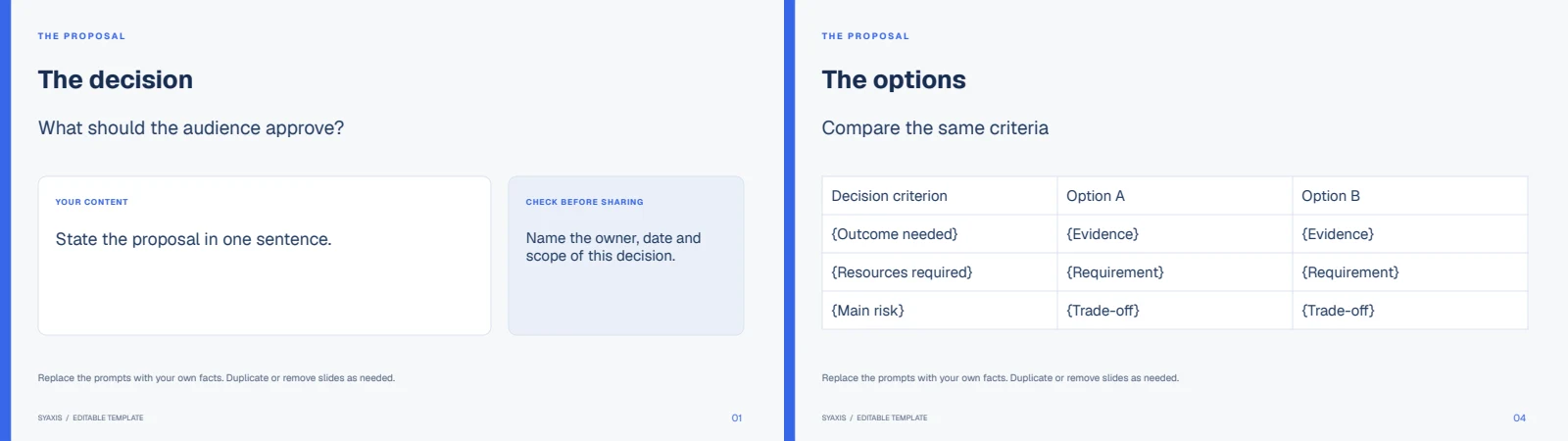
Proposal template: 6 slides (.pptx). Set out the problem, compare options and request a bounded decision. Preview the slides (.pdf).
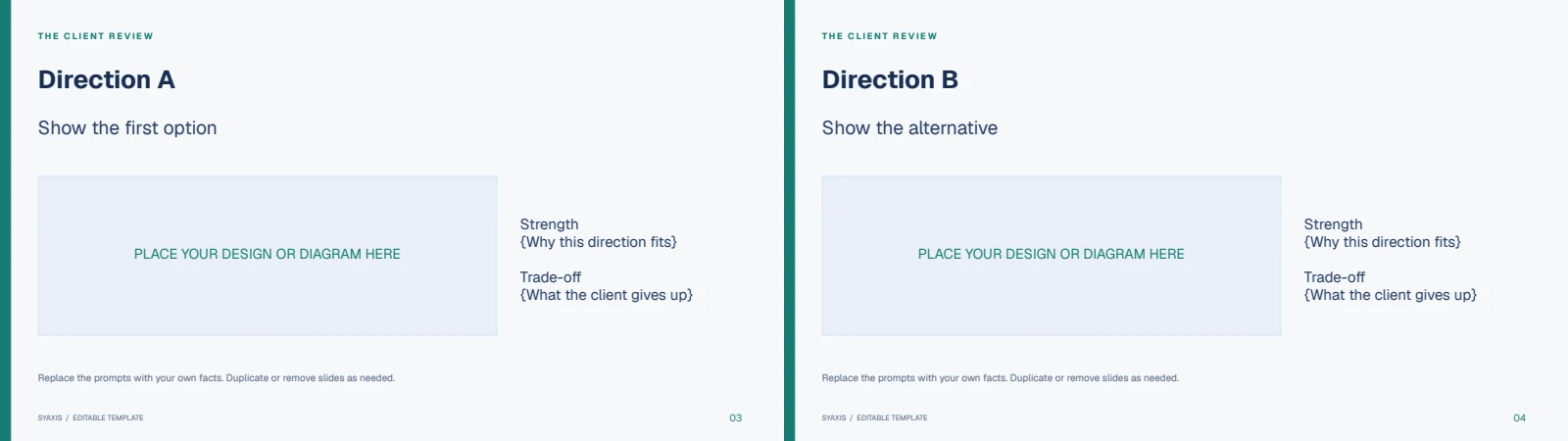
Client review template: 6 slides (.pptx). Compare two directions against agreed criteria, collect feedback and record the next action. Preview the slides (.pdf).
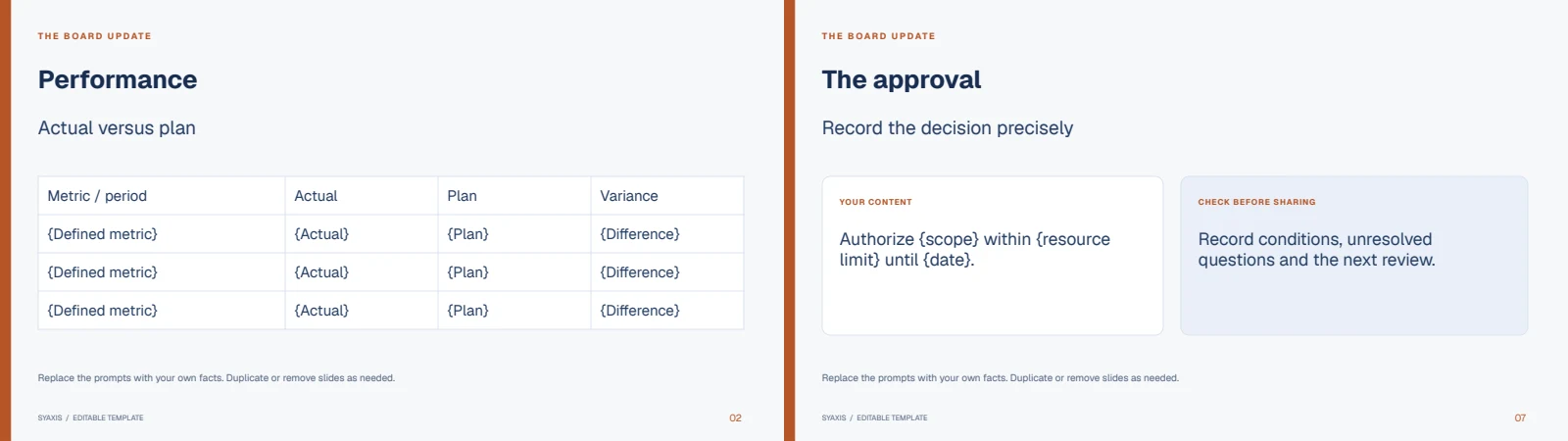
Board update template: 7 slides (.pptx). Present actual versus plan, explain the variance, identify risk and record an approval. Preview the slides (.pdf).
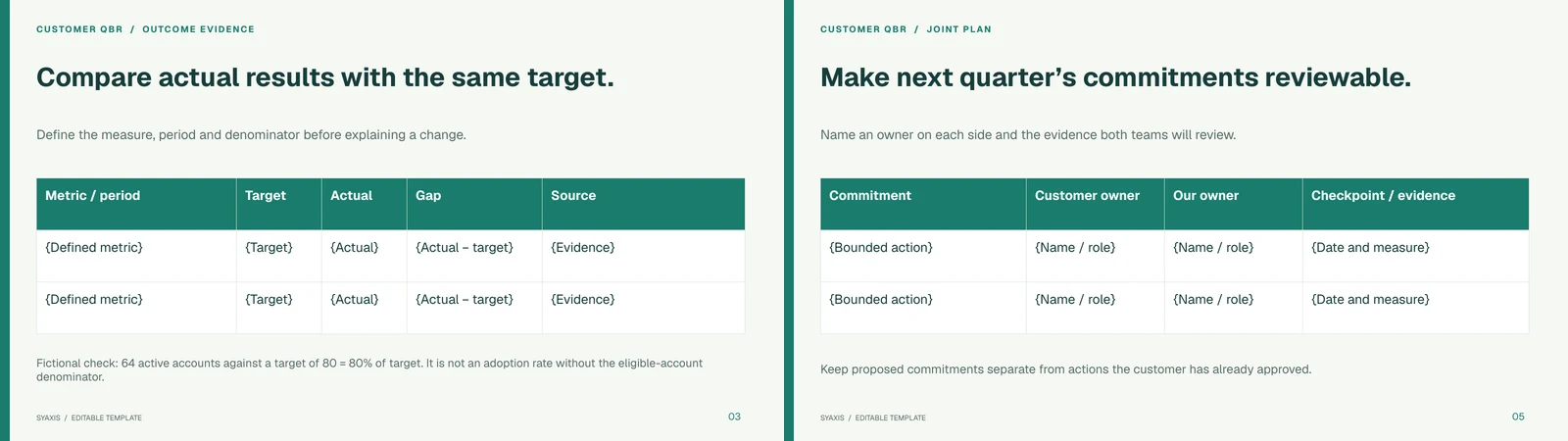
Quarterly business review template: 7 slides (.pptx). Review the customer’s agreed outcomes and record joint commitments. Preview the slides (.pdf), then follow the QBR agenda and example.
You may edit and use these templates for personal or commercial presentations. Open the PPTX in PowerPoint or import it into Google Slides, replace the placeholder text and inspect the layout. Install Geist or substitute your organization’s font if it is unavailable. The PDF previews show the intended design.
Choose the template by the decision your meeting needs
Use the proposal when you need approval for a bounded plan, the client review when you need feedback on two directions, and the board update when you need to explain performance and record a governance decision. Use the customer QBR to review agreed outcomes and set joint commitments for the next quarter. Start with the decision slide, then fill in only the evidence that supports it.
Each download contains editable text and shapes. The proposal also includes an editable options table; the board update includes an editable actual/plan/variance table. The client-review image areas are placeholders for your own designs. None of these files contains measured results, stock photos or a connected data source.
For a funding conversation, use the investor pitch templates. For an evidence-led account of one case, use the case-study worksheet and deck. These meeting templates remain general-purpose starting points rather than copies of those specialist guides.
| Template | Start by replacing | Check before sending |
|---|---|---|
| Proposal: 6 slides | The approval request, scope and alternatives in the options table | Each option answers the same decision, and proposed benefits remain separate from measured results. |
| Client review: 6 slides | The two design placeholders and the criteria used to compare them | Both directions use the same criteria, and the final slide asks for specific feedback. |
| Board update: 7 slides | The reporting period, actual/plan figures and approval request | The periods and units match, and the variance agrees with the figures shown. |
| Customer QBR: 7 slides | The agreed customer outcomes, actual results and joint action owners | Each result has a source, and both teams agree on the next-quarter commitments. |
Use these templates in Google Slides
These downloads are PowerPoint files that you can import into Google Slides. They are not shared Google Slides links or a one-click theme gallery. Download the PPTX for the proposal, client review, board update or QBR above; the PDF beside it is a visual reference.
Upload the PPTX to Google Drive and open it with Google Slides. To create a native Slides copy, choose File → Save as Google Slides. The original PowerPoint remains a separate file. Google documents this distinction in its PowerPoint-to-Slides guide.
Replace the placeholder text, then compare the slides with the PDF preview. If Geist is unavailable, choose a font available in your editor and inspect line breaks, label spacing and shape alignment. Share the converted presentation with the permissions your reviewers need; downloading a template does not grant anyone access to your Drive.
After import, change one title and one table cell, then download a PPTX copy and reopen it in the receiving editor. Compare it with the PDF preview, especially line breaks, tables and the paired design placeholders. The downloads were opened and rendered locally in LibreOffice; a live Google Slides import was not performed for this release.
A six-slide proposal outline
The example uses proposed content, not measured results. Replace the evidence notes with material you can substantiate.
Begin with the audience’s decision and write one supported point per title. If a slide needs two different conclusions, split it or move secondary detail into supporting material. Replace every evidence placeholder with your source; do not make up a saving to complete the layout.
| Slide title | Audience question · Evidence or content needed |
|---|---|
| Pilot a clearer handoff for two weeks | What are you asking me to decide? · Scope and approval request |
| The current handoff leaves ownership unclear | Why is a change worth considering? · Approved process notes and examples |
| A shared checklist would make the next action visible | What changes in the process? · Proposed before-and-after workflow |
| One team can test the change without a full rollout | How large is the commitment? · Team, duration and exclusions |
| Review completion and workload before expansion | How will we judge the pilot? · Measures, baseline and stop conditions |
| Confirm the owner and start date | What happens after this meeting? · Named roles and next checkpoint |
Agenda slide or decision-first opener?
An agenda slide tells the audience how the conversation will proceed; an outline is your working sequence for the whole deck. The editable pair gives you an audience-facing agenda and a decision-first alternative for the same fictional pilot. Use one as the opener. Keep the full rationale in the body and use the executive summary guide when the reader needs the report’s conclusions without attending.
Fit the outline to the time you actually have
For a ten-minute decision meeting, try one minute for the decision, two for the evidence, two for the options, two for the recommendation and three for discussion. That is seven minutes of prepared explanation, not ten minutes of slides followed by questions.
Rehearse aloud with the real chart or example. If the evidence takes four minutes, simplify it or move background to an appendix. Do not rush every sentence to preserve the original slide count. A dense chart may need longer than two simple slides.
Use a lesson sequence for a learning objective, a research sequence for a question and method, or a sales sequence for a buying decision. The downloadable templates here serve proposal, client-review and board meetings; the examples below show how other outlines differ.
An outline prompt you can adapt
“Create a six-slide outline for an operations manager deciding whether to approve a two-week handoff pilot. For each slide, give a conclusion-style title, the audience question it answers and the evidence required. Use the attached process notes. Mark missing inputs and avoid claims about savings or success that the notes do not support.”
If you choose to prepare an outline, use it as the brief for Syaxis presentation creation. You can also start directly with a research question or source files and let the agent plan, research, write and design the complete deck. During revisions, refer to the slide’s job: “Make slide four explain the pilot boundary” is easier to assess than “improve slide four.”
A seven-slide board update
Keep the main presentation focused on the meeting. Put detailed reconciliations and background material in an appendix or approved supporting pack so the main sequence does not become a data dump.
A useful request states the action, owner, resources and review point. In this example: approve a six-week guided-onboarding pilot for one defined customer segment, led by the onboarding manager, within an agreed support-capacity limit. Leave unknown amounts unresolved rather than inventing a budget.
In the fictional quarter, revenue is 920,000 against a plan of 1,000,000: a shortfall of 80,000, or 8% of plan. Activated accounts are 180 against a plan of 240: 60 fewer, or 25% below plan. These are different measures and should not be blended into a single “performance” score.
The slide needs the reporting period, currency and activation definition. If activation means completing three setup steps within fourteen days, keep that definition visible. Otherwise a change in the definition can look like a change in business performance.
The closing slide should also say what is not being approved. A pilot decision should not read like authorization for a company-wide rollout. The executive summary example shows how to state a recommendation and its conditions together.
| Slide | Headline · Supporting material |
|---|---|
| 1 · Decision | Approve a six-week onboarding pilot · Owner, requested resources and decision date |
| 2 · Performance | Revenue is below plan; activation is the larger operating gap · Actual-versus-plan table with period and definitions |
| 3 · Explanation | Activation delays are concentrated in setup · Funnel by stage and the evidence behind the interpretation |
| 4 · Options | Pilot a guided setup before funding a broader rollout · Comparison of doing nothing, piloting and full rollout |
| 5 · Risk | The pilot may shift workload onto support · Capacity estimate, owner and response |
| 6 · Milestones | Review adoption and workload before expansion · Start date, checkpoint and stop criteria |
| 7 · Approval | Authorize the pilot within the stated boundary · Exact approval request and unresolved conditions |
A six-slide client review
Open by restating the agreed objective and the scope of this review. For example, the meeting may approve the navigation direction while leaving detailed visual styling for the next stage.
“Do you like it?” invites a broad reaction. “Which label would your customers use for this task?” connects feedback to the objective. Give the client a clear way to distinguish a factual correction, a preference and a requirement.
When comments conflict, record the conflict rather than silently choosing one. Ask who owns the final decision and which criterion should govern it. This is particularly important when several client stakeholders attend with different responsibilities.
| Slide | Headline · Client action |
|---|---|
| 1 | Choose the navigation direction for the next prototype · Confirm the decision in scope |
| 2 | The current structure makes two key journeys hard to distinguish · Review the supplied evidence and assumptions |
| 3 | Option A groups pages by service · Inspect the proposed journey |
| 4 | Option B groups pages by audience · Inspect the alternative journey |
| 5 | The options trade simplicity against audience specificity · Compare using the same criteria |
| 6 | Approve a direction with these open questions · Name conditions, owner and next checkpoint |
An eight-slide research presentation
The question in this example is where new users experience confusion during setup.
Full guide: Research Presentation Examples and Structure.
Build the answer before the slide sequence
For a recommendation supported by records and interviews, use the case study writing guide and template. It explains how to distinguish a finding from a proposed intervention, then adapt the analysis into six consulting slides.
| Slide | Point to make |
|---|---|
| 1 · Recommendation | Pilot approval-routing rules before replacing the system |
| 2 · Baseline | The median approval time was six working days in the sample of twenty requests |
| 3 · Evidence gap | The log does not show which stage caused the delay |
| 4 · Options | Compare the current process, a routing pilot and system replacement |
| 5 · Pilot | Record stage-level timing, exceptions and the responsible owner |
| 6 · Decision | Agree who will run the pilot and what evidence is needed before expansion |
A pitch sequence that earns the concept
Introduce the audience and communication problem before revealing the creative direction. Otherwise the client must judge the concept on taste alone.
The fictional audience is interested in learning but uncertain about the time commitment. A concept that only shows beautiful classroom interiors misses that question. A more relevant story could show the journey from finishing work to attending a short evening session.
This is an editorial hypothesis to discuss with the client, not a claim established by research. If interviews or survey data exist, cite them. If they do not, identify the assumptions the client needs to confirm before production.
A scope slide should distinguish included outputs from optional work. “Campaign launch support” is too broad to price or approve confidently. Name the number and type of assets, the required source inputs, the review stages and the final file handoff.
Also name the approval dependency. If the client supplies course descriptions late, the production timeline may change. Showing this relationship early is more useful than hiding it in a dense final slide.
Separate speculative examples from promised deliverables. Showing three concept frames does not commit the team to unlimited revisions, production in every channel or rights to every depicted asset. Put the approval needed next to the scope it enables.
| Slide | Job · Example content |
|---|---|
| 1 · Brief | Confirm the business question · Help local adults understand the studio’s evening classes |
| 2 · Audience | Explain the communication barrier · Prospective learners need to see the time commitment and first step |
| 3 · Position | Choose the message · A practical place to start a new skill after work |
| 4 · Concept | Make the message tangible · An evening-class story shown across a launch deck and social assets |
| 5 · Deliverables | Bound the assignment · One presentation, a defined asset set and agreed revision rounds |
| 6 · Process | Show how the work gets approved · Brief approval, concept review, production and handoff |
| 7 · Measurement | Name what will be observed · Inquiry sources and enrollment steps, with an agreed baseline |
| 8 · Decision | Ask for the next commitment · Approve the direction and nominate the client approver |
A six-slide percentage lesson
The sequence alternates explanation and learner work rather than presenting six consecutive definition slides.
“Understand percentages” is broad. A more useful objective is: “Given two counts, calculate the percentage and identify the denominator.” This tells you what the lesson needs to teach and what the final check should ask.
A multiple-choice answer can show whether a learner recognizes a result. Add a short explanation: “Which group is the denominator, and why?” This makes it easier to distinguish a calculation error from a misunderstanding of the situation.
Keep the exit example different enough from the worked example to require transfer, while preserving the skill you intended to assess. If the task introduces a new concept, a wrong answer may not tell you what you think it does.
For beginners, model the denominator choice and arithmetic step by step. For a mixed group, provide that scaffold and add an extension: explain why two percentages with different denominators cannot be averaged directly. A short exit question should reveal the learner’s reasoning, not just recognition of the correct number.
| Slide | Teaching job · Example |
|---|---|
| 1 | Elicit prior thinking · What does “half the group” mean? |
| 2 | Model the calculation · 12 of 20 learners chose option A: 12 ÷ 20 × 100 = 60% |
| 3 | Contrast denominators · 12 of 30 is 40%, even though the count is unchanged |
| 4 | Guided practice · Calculate 9 of 15 and explain the denominator |
| 5 | Find the error · A claim uses the number responding instead of the full group |
| 6 | Exit check · Calculate a new example and explain what the percentage describes |
A QBR agenda that leads to a plan
Download the quarterly business review template: 7 editable slides (.pptx), or preview the QBR deck (.pdf). This original English-language template is for a customer review: agreed outcomes, target versus actual, evidence limits and joint commitments for the next quarter. Replace every prompt with your own approved information.
A QBR is a quarterly business review. For a customer review, start with the agreed outcome, compare actual results with the target, discuss unresolved issues and agree the next quarter’s commitments. Include both the customer’s owner and your own.
Use the previous quarter’s commitments as the opening reference. If the customer’s goals changed, state the change before showing results so the review is not measuring success against an obsolete target.
Fictional quarter: the target was 80 active accounts and the observed result was 64. That is 80% of target, not 80% adoption unless the eligible-account denominator is also 80. A launch delay occurred in the same quarter, but coincidence does not establish that it caused the entire gap. State the gap, confirmed events and what still needs investigation.
A customer QBR should return to the customer’s agreed outcomes and a joint next-quarter plan. An internal operating QBR can focus on ownership, resources and forecast adjustments. Neither should turn a count of meetings or logins into proof of business value.
The template is an editorial resource, not a recorded Syaxis-generated presentation. Text, tables and shapes can be edited. The PDF shows its intended layout; check fonts and line breaks in the application your customer will use.
| Version | Core sequence | Commitment |
|---|---|---|
| Customer QBR | Agreed objective → outcome evidence → unresolved issue → joint commitment | Both parties name an owner |
| Internal QBR | Plan → actual → qualified explanation → resource choice → next checkpoint | An accountable team owns the correction |
Check the evidence behind a research slide
For each candidate claim, record the original source, date, relevant passage and limitation. This prevents a polished summary from becoming the only surviving evidence.
Check whether several articles are repeating the same underlying source. Ten links do not constitute ten independent pieces of evidence when they all lead back to one press release or study.
Keep the source, page or table location, observation period and unit beside each finding in your working notes. Recalculate percentages from the numerator and denominator. If two sources disagree, preserve the disagreement and the reason you prefer one, rather than averaging incompatible results.
In the six-interview example, “four interviewees mentioned unclear ownership” describes this group. “Most users have unclear ownership” goes beyond the evidence. Label generated visuals as concepts when they could be mistaken for observed results. After a revision, check the final headline against the source again.
| Claim type | Source to seek | Boundary to preserve |
|---|---|---|
| Product feature | Current official documentation | Plan, interface and availability |
| Measured outcome | Original report or dataset | Period, population and method |
| Customer experience | Approved interview or feedback record | Who said it and what it can represent |
| Recommendation | Your reasoning from the evidence | Assumptions and alternatives |
- “Completion rose to 60%”: Find the numerator, denominator and period. Keep only with those definitions.
- “The change caused the improvement”: Look for evidence of causation, not just timing. Weaken or remove if unsupported.
- “The tool exports editable PPTX”: Check current official product documentation and plan. State the relevant qualification.
- “Customers prefer this option”: Inspect who was asked and how. Use the sample-specific finding if that is all the evidence supports.
FAQ
Are the PowerPoint templates free to download and edit?
Yes. The four original Syaxis templates on this page can be downloaded without an account and used in personal or commercial presentations. The PPTX files contain editable text and shapes.
Can I use these templates in Google Slides?
Import the PPTX into Google Slides and review fonts, line breaks and spacing. A file conversion can change the layout; the accompanying PDF gives you a visual reference.
What should I change before presenting?
Replace all placeholders, add sources for factual claims, name the decision owner and confirm dates and numbers. Delete any slide that does not help the audience understand or decide.
Bring it into your work.
Follow the complete AI presentation workflow to turn the outline into a reviewed deck and editable handoff.
How we prepare our guides
Syaxis uses AI to assist with drafting and translation. Comparisons draw on linked sources; they are not hands-on tests unless a test method is described. Worked examples are illustrative unless identified otherwise.


