Turn a finding into a recommendation.
Resident priorities, a courtyard concept
and a specific pilot to approve.
Turn a brief, your notes or source material into a complete presentation.
Built-in research. Revisions through chat. PowerPoint export.
Explore client proposals, research presentations and lesson slides. Start with a clear audience and a useful next step.
Resident priorities, a courtyard concept
and a specific pilot to approve.
Street-level diagrams that explain
where shade can make a difference.
A useful model, a worked example
and an exercise for the next day.
Use Syaxis as an AI pitch deck generator, build a sales presentation or prepare a quarterly business review. Start with your notes and sources; built-in research helps develop the story before AI creates the slides.
Build useful evidence into the story as it develops.
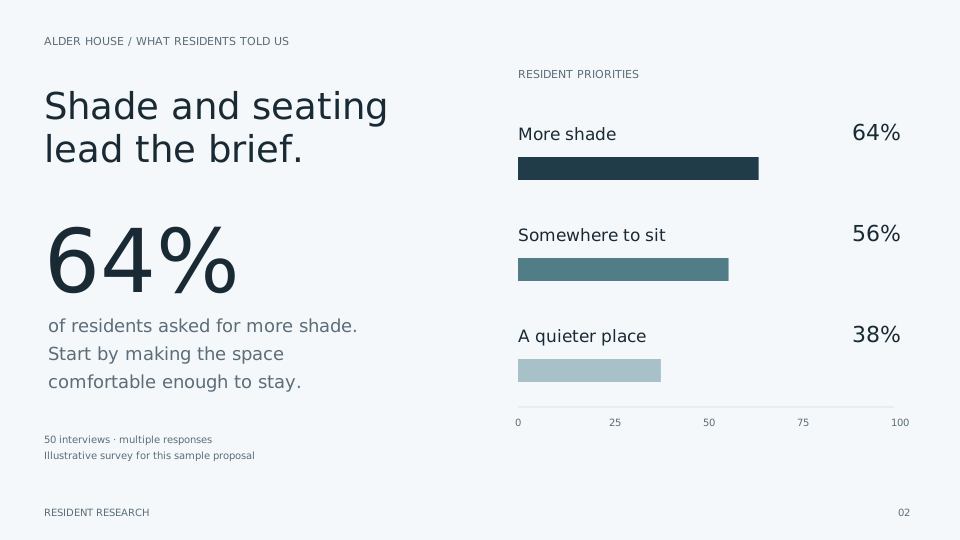
32 of 50 residents asked for more shade.
28 mentioned seating.
19 wanted a quieter place.
Move the recommendation to the opening slide, simplify an explanation or change the visual direction. Describe the revision in chat, check the result and export your presentation to PowerPoint when it is ready.
Make it your presentationBuild a deck, explore a question or create an image. Use model choice in Chat on eligible paid plans.
Comfort, shade and somewhere to sit
give people a reason to stay.
Design for passing through,
meeting up and spending time.
Explore a subject, compare sources
and follow the questions that matter.

Create a visual for the idea
you want people to see.
Open with the recommendation,
show why it matters, and close
with one concrete next step.
A sounding board for the questions
around the work, big or small.
Browse Syaxis and its presentation guides in nine languages. Choose your language below, then tell Syaxis which language your audience needs when you brief your deck. Review the wording and figures before sharing.
One workspace for presentations, research, chat and images.
Choose the plan that fits how much you create.
For your first presentation.
For the work you present regularly.
For more projects and deeper work.
For a full calendar of ideas.
Credits cover AI usage across your workspace. Allowances refresh monthly.
Presentation builds and AI edits use credits; usage limits apply to each plan.
Choose your model in Chat with Basic and above.
Presentations and everyday AI, in one place.
 OpenAI
 Claude
 Grok
Grok Qwen
Qwen Kimi
Kimi GLM
GLMBuild an investor pitch deck around your product, market evidence and funding ask; a sales presentation around a customer’s needs and your proposal; or a marketing plan around audiences, channels and priorities. For a quarterly business review, bring the results and decisions for the next quarter. You supply the facts and review the finished slides.
Syaxis works as an AI PowerPoint generator: give it a topic, brief or source material, and it develops the research, structure and slide design. Revise the presentation through chat, then export a .pptx file.
Start with a topic, pasted notes or source files such as PDFs and Word documents. Include the audience, the decision you want to support and any figures that must stay accurate. Syaxis uses that material to build a new presentation; it is not a page-for-page PDF converter. See the PDF-to-PowerPoint guide for selecting the evidence and planning the slides.
Yes. Open your saved presentation and ask its chat for a specific change: shorten a slide, explain the proposal to a different audience or change the visual direction. Say which facts should stay fixed, then review the result. Follow the presentation workflow for briefing, revisions and export.
Yes. Download a PowerPoint (.pptx) file for your next meeting or to continue editing in PowerPoint. Check the exported slides before presenting. Free exports include “Made with Syaxis” branding.
Research is built into presentation creation. You can also use Chat to explore ideas and create images. A dedicated Research experience is coming soon. Usage depends on your plan. The research presentation guide explains how to keep findings, sources and conclusions distinct.
Syaxis is operated by Syaxis, LLC. We process your content to provide the service and do not use it to train AI models ourselves. Third-party AI providers have their own retention and use practices, which may include training under their terms and settings. Read our Privacy Policy for the details.
Basic and above include model choice in Chat. Free uses Auto. Model availability and usage limits are shown in the plan details. Model access in Syaxis does not include subscriptions to the providers’ own apps or their app-specific tools.
Yes. Free includes 100 credits per month and up to 1 presentation build per period, subject to available credits. Free PowerPoint exports include Syaxis branding. Deleting a deck does not restore a used build allowance.
Build an AI presentation from notes and sources. Learn how to write the brief, review the story, revise slides through chat and export a PowerPoint file.
Turn a PDF report into PowerPoint with AI: choose conversion or a new deck, map source facts to slides, revise safely and inspect the PPTX.
Use multiple AI models in one chat workflow while keeping approved facts, corrections and source material clear. Understand plan and access limits.
A topic, a brief, a few pages of notes.
You don’t need to have the slides figured out.
Start with what you have.