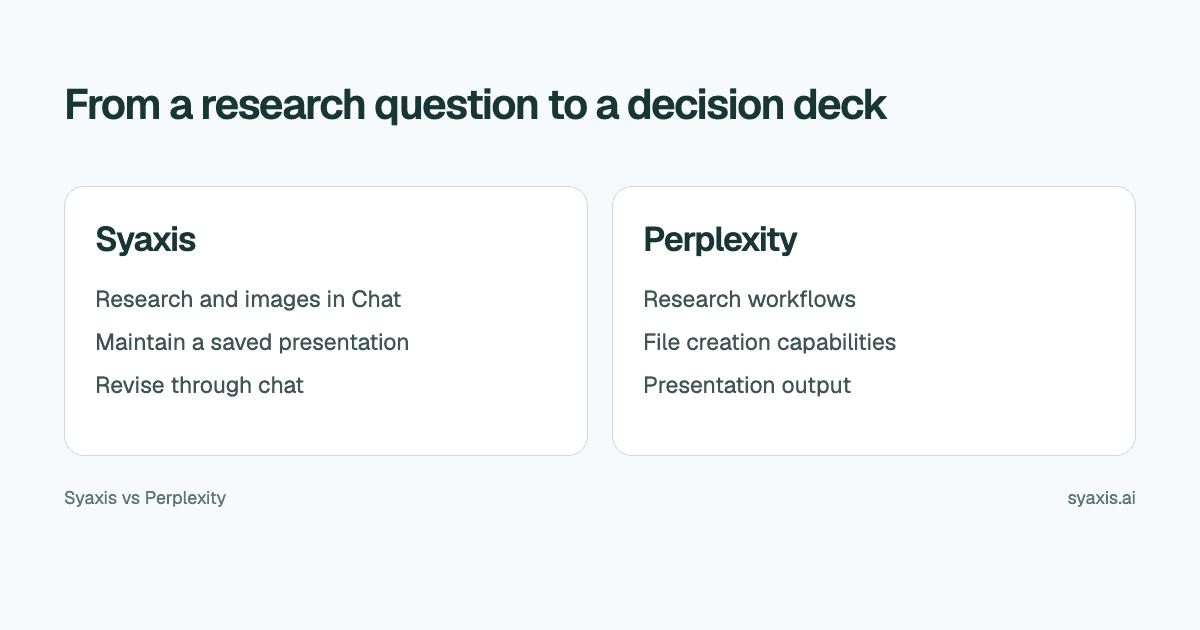
Perplexity can turn research into presentations and other files, so research and PowerPoint output are shared capabilities here. Syaxis combines researched deck creation, a saved presentation workspace, everyday multi-model Chat and image generation and editing. Perplexity emphasizes research and source discovery with file and app creation under its plan conditions.
In Syaxis, a simple brief can start presentation creation directly; research and content preparation happen within that workflow. Chat is optional preparation when you want to examine sources and shape the material yourself.
Choose Syaxis when you want to switch between conversational slide revisions and direct slide-text corrections in a dedicated deck workspace, alongside research and image work in Chat. Choose Perplexity when its research environment and prompt-based asset workflow are the better fit. Both support research, multiple models, images, presentation previews and continued revisions; those shared capabilities are not exclusive reasons to choose Syaxis.
Written by Syaxis from product documentation reviewed on October 9, 2026.
One Syaxis subscription covers everyday AI Chat, research, images and presentations, within plan allowances.
Syaxis offers direct slide-text editing in its deck workspace; Perplexity documents prompt-based asset edits and downloading for full manual control.
Perplexity separates Research from Create files and apps in its plan allowances; compare the tasks you actually need.
Compare the deliverable and the working environment
Perplexity's consultant workshop describes PPTX output for generated presentations. Its plan guide distinguishes research and file-creation access.
The same Perplexity plan guide lists image generation and access to advanced models on paid plans. Those are shared capabilities, not reasons by themselves to claim Syaxis replaces Perplexity.
Perplexity’s asset-creation guide documents previews, follow-up edits, version history and Google Drive export. It directs users to download the file for full manual editing control.
| Decision | Syaxis | Perplexity |
|---|---|---|
| Central task | Brief → built-in research and content preparation → slides | Research and deliverables through Create files and apps |
| Research | Built-in research during presentation creation; web search, source reading and uploaded-file analysis in Chat | Dedicated research capabilities with plan conditions |
| Source material | A simple brief is enough; optionally add notes or files, or curate the content in Chat first | Web and file workflows described by Perplexity |
| Revisions | Revise the saved deck through conversation and edit slide text directly | Follow-up prompts, previews and version history; download for full manual control |
| Presentation delivery | Editable PowerPoint (.pptx), PDF reading copies and PNG slide images | PPTX and HTML; connected Google Drive export |
| Everyday Chat and models | General-purpose Chat; supported models from multiple providers on Basic and above; Free uses Auto | Research, model access and image/file creation vary by plan |
| Image work | Generate images from a prompt, then edit them with feedback in Chat; uploaded images can also be edited | Image generation and access to advanced models on eligible paid plans |
Narrow the research question before asking for slides
‘Research the market’ is too broad to produce a useful decision deck. A market-entry team may actually need to know whether a specific customer segment has a problem it can address, which alternatives already serve it and what evidence would justify a pilot.
An illustrative brief is: ‘Prepare a presentation for a decision on a small market-entry pilot. Limit the scope to the selected country and customer segment. Separate measured demand from vendor claims. Explain the evidence gaps, the leading risks and the next research needed before a larger commitment.’
This creates a boundary for source selection. An article about a global trend may be context, but it does not by itself answer whether the target segment in one country will buy. Both the research and the deck should preserve that distinction.
Carry the source relationship into the presentation
A research summary can contain many links while still making an unsupported conclusion. The useful question is whether the source supports the exact population, period and claim shown on the slide. This is especially important when a long report is compressed into a short recommendation.
Keep an evidence ledger while reviewing the work. This is an authoring aid, not an automatic Syaxis citation feature.
| Field | What to record |
|---|---|
| Claim | The statement the audience will read |
| Source and date | The original reference and the period it describes |
| Scope | Country, sample, customer group or other boundary |
| Qualification | What the source does not establish |
| Slide use | Where the claim appears and why it affects the decision |
Create from a brief, or curate the research yourself first
For the market-entry question, you can give Presentations a brief naming the country, segment and decision; its workflow researches and organizes the content before building the deck. If you want to investigate the evidence yourself first, use Syaxis Chat to research public sources or analyze reports you upload. Ask for the sources behind the demand claims and the gaps that still prevent a confident recommendation. You can stop with a research conversation; creating a deck is optional.
You can also generate or edit an illustrative image in Chat. When a presentation is needed, ask Chat to create the pilot briefing using the agreed scope and evidence. The result opens in a dedicated presentation workspace. Use that workspace’s chat to move the evidence gaps before the investment recommendation, and direct text edits for exact approved wording.
Syaxis lets you alternate between conversational slide revisions and direct text corrections in the presentation workspace. Perplexity also keeps revisable presentation assets, with previews and history; its guide directs users to compatible local software for full manual control. Research and images in Syaxis are capabilities within Chat, not separate product surfaces.
When the research environment is the main requirement
Perplexity’s plan comparison separates Research from Create files and apps. Free does not include file/app creation; Pro includes a limited allowance, and Max extends it. Access to research answers therefore does not establish access to presentation creation.
Perplexity’s asset guide describes requesting a deck, previewing it and refining it with follow-up prompts. You can keep working from the research conversation rather than copying the answer manually into another service. The Perplexity presentation guide covers that process.
If you bring an existing research summary into Syaxis, retain its references, dates and evidence boundaries. The handoff is only useful if the summary remains faithful to the sources. A more concise presentation should not convert tentative findings into certainty.
Choose what the audience needs to do next
A decision maker may need a fixed reading copy, while an analyst may need to update the presentation as new evidence arrives. Syaxis exports PDF, PowerPoint and PNG for those different delivery roles. PPTX is relevant for continued editing; PDF suits a fixed copy; PNG supports image-based reuse.
Perplexity also documents PPTX output for generated slides. Check the file in the receiving application and identify which elements the next owner needs to change. A chart image is not the same as editable chart data, regardless of which service produced it.
One subscription for questions, research, images and presentations
Syaxis Chat is useful independently of presentations: ask a question, learn a topic, draft text or plan work. Web research and image generation or editing also happen in Chat, and the same subscription includes deck creation. If that mix covers your needs, Syaxis can replace separate paid tools for chat, research, images and slides. Perplexity also bundles multiple capabilities; compare the tools and allowances you actually use.
Check the allowance for the task you will repeat: research queries and file-creation tasks are separate entries in Perplexity’s plan table. For a weekly market briefing, both matter. A search subscription label alone is too broad a basis for estimating presentation capacity.
Syaxis plans combine presentation allowances and credits with Chat access. Free uses Auto and has branded exports; Basic and above allow supported model selection in Chat. That does not include a native Perplexity subscription or imply identical research tools.
Choose Syaxis when maintaining the presentation and revising its argument is the core workflow. Choose Perplexity when its research environment and available deliverable tools already fit the job. Use the research presentation guide to improve the evidence structure whichever product you choose.
FAQ
Can Perplexity make PowerPoint presentations?
Perplexity documents presentation creation and PPTX output. Check the relevant creation mode and account access; the capabilities of a basic search response should not stand in for the whole product.
Can I create a presentation on Perplexity Free?
The plan comparison reviewed here excludes file and app creation from Free. Pro includes a limited creation allowance and Max extends it. Research access is a separate entitlement, so do not assume a search result can always be turned into a deck on the same plan.
Does Syaxis research topics only while creating a deck?
No. Syaxis Chat supports web research and working with uploaded sources independently of presentations, as well as image generation and editing. Deck creation also includes research. Perplexity has its own dedicated Research and creation workflows; Syaxis does not claim an identical deep-research product or a separate research-report surface.
Should I use both services?
Only if the handoff is useful. You can bring an approved research summary and supporting material into a Syaxis brief. Keep sources and assumptions attached to the work so that the deck does not lose their meaning.
Choose Syaxis when you want research and images in Chat plus a presentation workspace where you can make both conversational revisions and direct text corrections. Choose Perplexity when its research-to-asset workflow, previews and connected delivery suit the task. Both maintain revisable decks; the practical decision is the editing controls and research environment you prefer.
How we prepare our guides
Syaxis uses AI to assist with drafting and translation. Comparisons draw on linked sources; they are not hands-on tests unless a test method is described. Worked examples are illustrative unless identified otherwise.
Create a presentation
Turn your source material into a presentation, then refine the deck through chat.